Hi guys.
Couple of issues with my JB4.
I've ticked the auto connect option but every time I start the car it's not connecting, I hit the big green connect button and it hooks up immediately, just won't connect automatically.
Next, if I put it into map 1, when I next use the car it's in map 3 instead of staying in the last map setting.
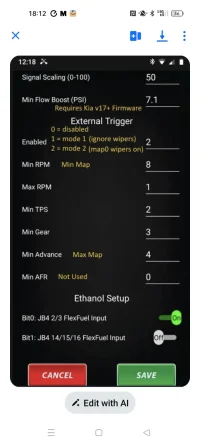
Finally, I've been through the whole app and can't for the life of me find the page for setting the wiper stalk adjust settings, in fact I don't think my app has the option!
I've attached a picture of what I've seen of other owners.
Thanks for any help.
Couple of issues with my JB4.
I've ticked
the auto connect option but every time I start the car it's not connecting, I hit the big green connect button and it hooks up immediately, just won't connect automatically.Next, if I put it into map 1, when I next use the car it's in map 3 instead of staying in the last map setting.
Finally, I've been through the whole app and can't for the life of me find the page for setting the wiper stalk adjust settings, in fact I don't think my app has the option!
I've attached a picture of what I've seen of other owners.
Thanks for any help.